KBI0028: Create a DataLad dataset from Nextcloud (Sciebo) public share links
- authors:
Michał Szczepanik <m.szczepanik@fz-juelich.de>
- discussion:
https://github.com/psychoinformatics-de/knowledge-base/pull/104
- keywords:
nextcloud, sciebo, webdav, sharing, addurls
- software-versions:
datalad_0.19.2, datalad-next_1.0.0b3, webdav4_0.9.8, fsspec_2023.6.0, sciebo_10.12.2
A DataLad dataset can be created directly from an existing collection of files in a cloud storage, using share URLs to provide file access. Nextcloud storage platform (and, by extension, Sciebo, a Nextcloud-based regional university service) allows generation of folder share URLs with optional password protection and expiration time. Creating such share links, as well as granting access to specific Nextcloud users, is an option for sharing data with managed permissions. In such use case, DataLad is an optional method of accessing and indexing data.
This document deals specifically with files that were deposited in Nextcloud without using DataLad. For publishing DataLad datasets to Nextcloud, see the documentation of DataLad-next’s create-sibling-webdav command instead.
This document extends the addurls-based approach described in
KBI0007: Create a DataLad dataset from a published collection of files in two areas: it introduces the uncurl special
remote for transforming URLs and using credentials, and focuses on
Nextcloud-specific URL patterns.
Nextcloud URL patterns
There are three primary ways in which a Nextcloud folder can be shared. These will determine the URL patterns which can be used.
URL pattern - summary
In summary, it is useful to represent the WebDAV URL as a combination of the following components:
<instance>/<accesspath>/<dirpath>/<filepath>
where:
<instance>is the instance URL (https://example.com/nextcloud/in given examples)<accesspath>is eitherremote.php/dav/files/USERNAME/orpublic.php/webdav<dirpath>is the path to the shared folder in user’s home directory (none for public shares)<filepath>is the path to a particular file relative to the shared folder (<dirpath>)
Listing files
For generating the dataset using the addurls command, a list of file names (relative paths) and
their respective URLs is needed. These can be generated automatically,
e.g. with the webdav4 and fsspec Python libraries.
An example script is given below, using inline comments for explanations.
The example assumes that user’s webdav credentials are already known
to DataLad under the name webdav-mycred (if not, these can be
added with datalad credentials add, or provided to the script in a
different way, e.g. as environment variables).
import csv
from pathlib import PurePosixPath

from datalad.api import credentials
from webdav4.fsspec import WebdavFileSystem

# Retrieve Nextcloud credentials from DataLad
cred = credentials(
    "get",
    name="webdav-mycred",
    return_type="item-or-list",
)

# Create a fsspec filesystem object, with user's Nextcloud home as root
fs = WebdavFileSystem(
    "https://example.com/nextcloud/remote.php/dav/files/USERNAME/",
    auth=(cred["cred_user"], cred["cred_secret"]),
)

# Shared directory, contents of which should be listed
DIRNAME = "sharing/example"

# List files in the shared directory, writing outputs to a csv file for addurls
with open("listing.csv", "wt") as urlfile:
    writer = csv.writer(urlfile, delimiter=",")
    writer.writerow(["name", "href"])

    for dirpath, dirinfo, fileinfo in fs.walk(DIRNAME, detail=True):
        # fileinfo is a dict, with file names as keys,
        # and dicts with actual file info as values;
        # we need path ({"name": "..."})
        # and URL component ({"href": "remote.php/dav/..."})
        for f in fileinfo.values():
            name = f["name"]
            href = f["href"]

            # reported path is relative to root of fs object,
            # what we need is relative to the directory that we walk
            relpath = PurePosixPath(name).relative_to(DIRNAME)

            writer.writerow([relpath, href])
This would produce the following csv file:
name,href
file1.dat,/remote.php/dav/files/USERNAME/sharing/example/file1.dat
foo/file2.dat,/remote.php/dav/files/USERNAME/sharing/example/foo/file2.dat
...
Creating the dataset
In a DataLad dataset, the process of accessing files that were added
via download URLs is handled by a git-annex special remote. The
uncurl remote, available in the DataLad-next extension, provides
both the ability to reconfigure URLs and the access to DataLad-next’s
credential workflow. It can be initialized as follows (optionally with
autoenable=true) inside a DataLad dataset that has been created:
git annex initremote uncurl type=external externaltype=uncurl encryption=none
With a known URL pattern (see above), a match expression for the uncurl special remote can be defined upfront. Defining a match expression allows us to isolate identifiers (such as dirpath, filepath, etc) in the URL pattern, which becomes particularly useful when URLs need to be transformed in future.
The regular expression below is relatively generic, with only the
dirpath being given explicitly, and specific to the given
example. Note that if dirpath included spaces, they would have to
be url-encoded; otherwise, the uncurl remote would split the
expression into two. Websites like regex101 can be helpful in
building and understanding the expression:
git annex enableremote uncurl match="(?P<instance>https://[^/]+)/(?P<accesspath>remote\.php/dav/files/[^/]+|public\.php/webdav)/(?P<dirpath>sharing/example)/(?P<filepath>.*)"
Finally, files are added to the dataset with datalad addurls using the previously generated csv file:
datalad addurls listing.csv https://example.com/nextcloud{href} {name}
Transforming URLs
Assuming the same user moves the folder in their Nextcloud account to
some/other/place/, access to the files in the same DataLad dataset
can be retained by setting the URL template of the uncurl remote. The
URL template has access to the same identifiers isolated previously
with the match expression, and in the case of this example can use
these defined parts with only dirpath having to change:
git annex enableremote uncurl url='{instance}/{accesspath}/some/other/place/{filepath}
A different user with whom the dataset is shared would have to
additionally replace accesspath, and (possibly) instance.
A user with whom the access was shared via a link would need to change
accesspath, and would not be using dirpath:
git annex enableremote uncurl url='{instance}/public.php/webdav/{filepath}
Credential caveats
Regardless of whether the files are accessed via the
remote.php/dav/files/USERNAME/ or public.php/webdav path, the
authentication realm for the given Nextcloud instance is the
same. This means users who already have DataLad credentials saved for
the given realm would see their requests for password-protected
links refused. As long as get does not support explicit
credentials, this can be circumvented by unsetting the credential
realm.
If a share link is not password protected, the webdav access via
public.php/webdav can still be used. However, this requires
creating a DataLad credential with the token as username, and a
nonempty password (e.g. a single space or xyz) that would not be used.
Caveats of sharing via public link
When sharing datasets via the public.php/webdav path, data providers need to ensure write permissions on the share:
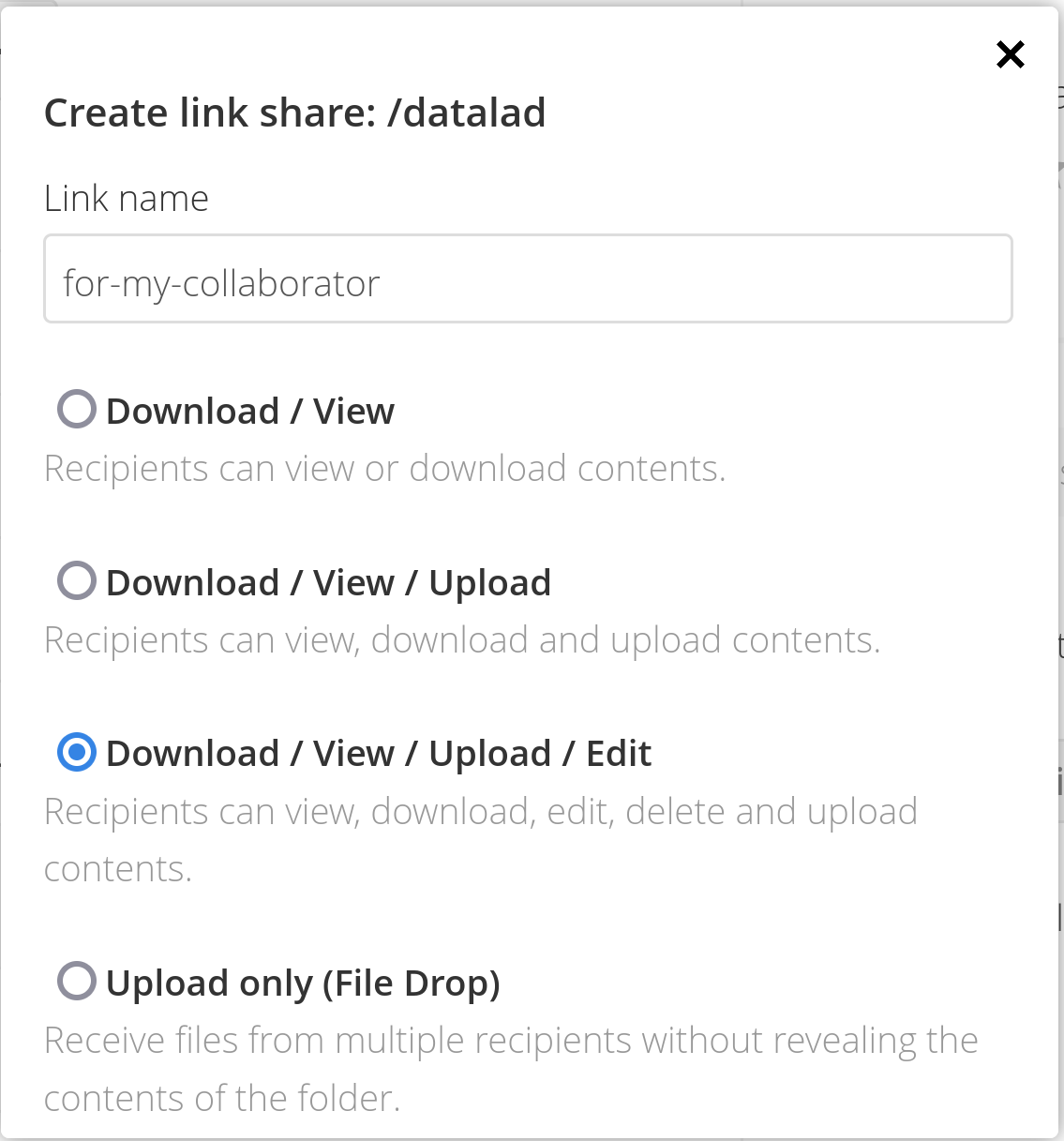
Otherwise, data consumers will fail to clone the dataset, as git-annex requires a brief, temporary edit when interacting with the special remote.
In order to clone, consumers need to use the public link and password instead of their own webdav credentials:
export WEBDAV_USERNAME='<LAST-PART-OF-PUBLIC-LINK>'
export WEBDAV_PASSWORD='<SHARE-PASSWORD>'
For example, if the public link is https://my-webdav-instance.com/s/fKTtnEIqFNP5Eia, the WEBDAV_USERNAME variable should be set to fKTtnEIqFNP5Eia.
Finally, as storage siblings to WEBDav services are not autoenabled, either the consumer or the producer should take care to enable it.
However, as the URL behind the storage sibling created by the producer (following the pattern /remote.php/dav/files/<USERNAME>) is different from the public URL the dataset is shared with (following the pattern .../public.php/webdav), enabling this special remote and file retrieval would fail for a consumer (unless they had the producer’s credentials).
To circumvent this, a second special remote with the public URL but otherwise identical properties needs to be initialized:
git annex initremote sciebo-storage-public --sameas sciebo-storage type=webdav exporttree=yes encryption=none url=https://fz-juelich.sciebo.de/public.php/webdav
In the above call, webdav-storage-public is a new special remote, set up sameas the previous webdav-storage special remote that was created with the producer’s initial `create-sibling-webdav call.
After this has been set up (and pushed), the special remote webdav-storage-public can be enabled after cloning with the credentials from the public link.